Choose a photo
Pick from Photos, take a picture, or begin with a saved workflow.
Image Resizer for iPhone
Resize, compress, crop, and convert photos in one simple app. Preview the result, then save or share with confidence.
Free core editing · Optional one-time Remove Ads purchase · Version 2.0
A focused photo workflow
The redesigned interface keeps photo selection and the most useful workflows within easy reach.
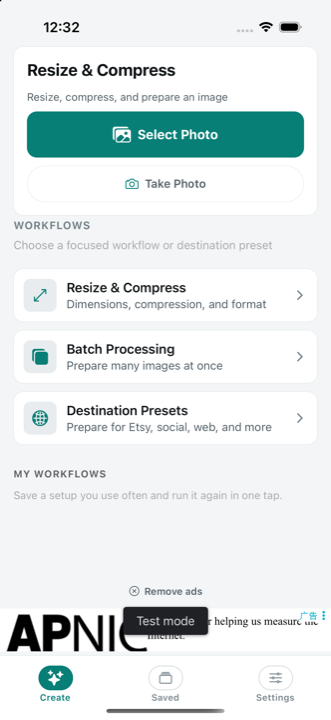
Select one photo, process a batch, open a destination preset, or return to a saved recipe. The real app screen shown here comes from the current IPR 2.0 simulator build.
Four clear steps
A direct path from the original photo to the result you need.
Pick from Photos, take a picture, or begin with a saved workflow.
Resize, compress, crop, convert, or choose a destination preset.
Review dimensions, file size, and the processed image before saving.
Save to Photos or share the processed file where it needs to go.
The essentials, together
Use exact width and height, percentages, common presets, and an optional aspect-ratio lock.
Reduce file size while choosing the quality level that suits your image.
Reframe the photo before processing while keeping the rest of your recipe intact.
Prepare output as JPEG, PNG, or WebP from the same focused editor.
Apply a consistent setup to multiple photos instead of repeating every adjustment.
Inspect the processed result and key output details before the final save.
Simple pricing
No subscription is required for the core editing tools.
Resize, compress, crop, convert, use presets, batch process, save workflows, preview, and export.
A one-time purchase removes advertising permanently. It does not change the editing tools available to you.
Final price is shown by Apple in your region.
Questions, answered
No. Core editing features are free. The optional one-time purchase removes ads.
You can prepare output as JPEG, PNG, or WebP.
Yes. Batch processing applies a consistent recipe to multiple selected images.
Yes. Save a workflow and run the same resize, compression, format, and destination setup again later.
Image processing happens on your device. The app does not need to upload your photos to an image-processing server.
Get Image Resizer for iPhone and prepare your next image in a few focused steps.
Download on the App Store